Amazon agent access
Compare products, check current deals, review orders or prepare a cart for your approval.
“Find the best option and show me the total before I order.”Continue on Amazon
When dot, Grok Bot or Instinct hits a wall on Amazon, Yelp, Delta or Amex, send it to browse.sophtron.com.
Sophtron handles browser access.
Your agent keeps working.
Keep your agent. Keep your task. Change the browser.

Illustrative handoff. Watch the recorded Amazon demo below.
Choose a website, copy the instruction, and send it to your personal agent. The agent follows Sophtron’s browser setup instructions and resumes your task.
Your agent needs tools that can follow the setup instructions and call Sophtron’s browser API.
The recording shows Grok Bot opening Amazon through Sophtron, finding a product, handling secure sign-in and presenting an order for the user to review.
The user asks Grok Bot to open browse.sophtron.com, then to open Amazon through Sophtron. The agent searches for running lights, compares products, and adds the selected item to a cart. For sign-in, it directs the user to Sophtron’s secure credential and verification forms. The final excerpt shows an order total and an approval prompt before the purchase. The recording does not show a completed purchase.
Sophtron Browse gives your agent a real browser it can observe and control. Sophtron manages access, bot challenges and browser sessions. Your agent decides what to click, type and do next.
Tell it to open browse.sophtron.com. It reads the setup instructions and connects to the browser stack.
Complete required sign-in and verification through the secure form. Your password belongs in the form, not in the chat.
It reads pages, follows links, fills forms and continues the task. Review consequential actions before you commit.
This screenshot shows dot opening Amazon through Sophtron, requesting sign-in and verification through secure forms, and returning the signed-in homepage.
The user stays in the same conversation. Sophtron provides the browser underneath it.
View the full screenshot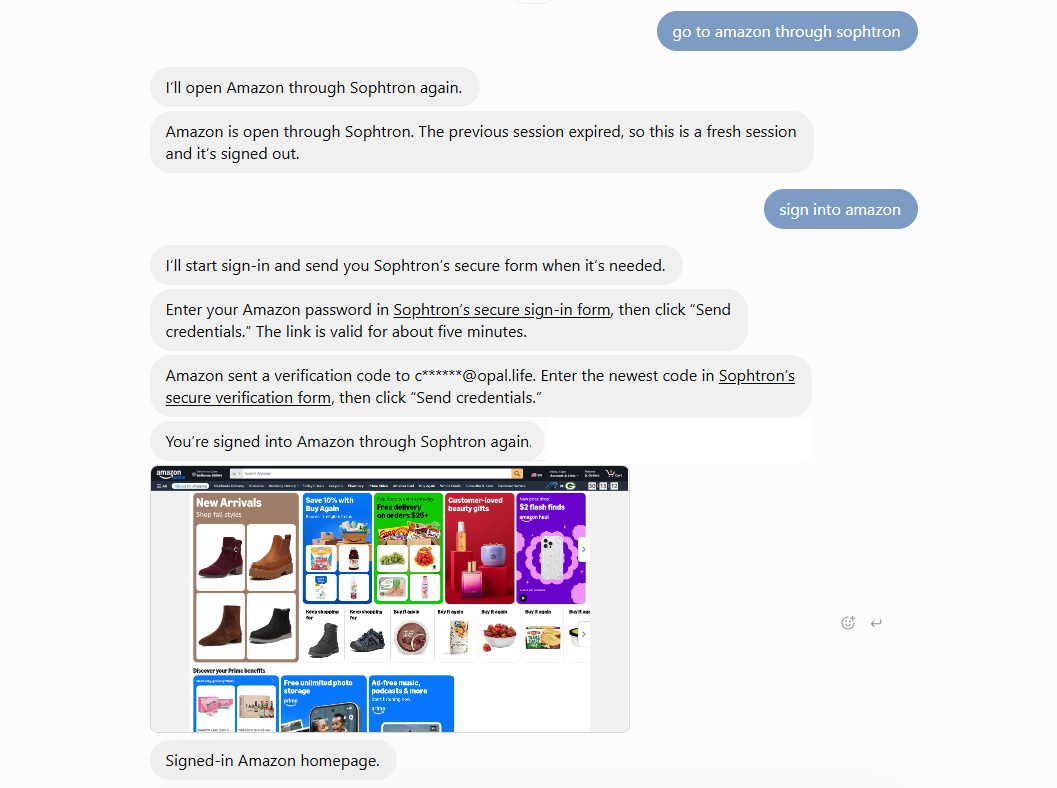
Shopping, local research, travel and personal accounts. Give your agent a browser that can reach the site, then let it continue the work you asked for.
Compare products, check current deals, review orders or prepare a cart for your approval.
“Find the best option and show me the total before I order.”Continue on Amazon
Compare local businesses, read reviews, check opening hours and narrow down your options.
“Compare three nearby plumbers and explain which one fits.”Continue on Yelp
Look up flights, review an existing trip or check account and loyalty details in context.
“Check my trip and show me the available flight options.”Continue on Delta
Review transactions, find statements, check rewards or compare offers in your own account.
“Find offers that match the purchases I’m planning.”Continue on Amex
Example tasks for your agent. Platform and agent names identify use cases; they do not imply a partnership or endorsement.
Sophtron’s secure sign-in forms keep passwords and verification codes out of the chat. Your agent can still see the account pages it needs to complete your request.
Explore Sophtron securityEnter credentials in the one-time form for the target website. Don’t paste them into your agent conversation.
Complete the website’s required verification. Browser unblocking does not replace account ownership or MFA.
The starter prompt asks your agent to pause before orders, payments or account changes. Your agent’s own permissions and approval controls still apply.
Ask your agent to open https://browse.sophtron.com, follow its browser setup instructions, and continue your Amazon task through Sophtron. Complete sign-in or verification in the secure form when requested. Your agent then navigates Amazon using Sophtron’s browser.
Sophtron Browse is designed for personal agents that can read setup instructions and call a browser API. The examples on this page show dot and Grok Bot using Sophtron with Amazon. You can give the same starter instruction to Instinct or another capable agent; its available tools and permissions determine whether it can connect.
Websites can evaluate the browser environment, network reputation, automated behavior and session state. An agent can encounter a bot challenge even when you have authorized a legitimate task. Sophtron provides a browser stack focused on handling these access barriers and maintaining the session.
No. Sophtron provides the browser and access infrastructure. Your existing agent observes the page, decides what to do, and sends browser actions such as clicking, typing or navigating. You keep using the agent and conversation you started with.
Sophtron’s browser stack handles unblocking and automatic CAPTCHA solving as part of website access. Account authentication is separate: you still provide your own login and complete any required verification through the secure sign-in flow.
Your agent can use the browser to read pages and interact with website controls, including preparing a cart or navigating account workflows. Ask it to get your approval before purchases, payments or important account changes. The video shows an order-review step, not a completed purchase.
You do not need to write integration code to try the handoff. Give your current agent the starter instruction. The agent must have the tools and permissions needed to follow Sophtron’s setup instructions and use its browser API.
Use Sophtron’s browser infrastructure directly, or explore the Action API and MCP server for broader account workflows.
Send your agent to browse.sophtron.com.
Copy the instruction